Unleashing Web Workers in Angular: A Developer’s Guide
Angular is powerful. But even power needs a sidekick. Enter Web Workers — your app’s behind-the-scenes performance booster.
What is Web Worker ?
We know that Javascript is a single threaded language, therefore, multiple scripts cannot be executed at the same time as it has been designed to work in a single threaded environment.
Consider a scenario in which you need to perform numerous tasks, such as pre-processing a huge quantity of API data, Unit conversion, and so on now during these computations, CPU usage will be high and Javascript will cause your web page to hang.

Web Worker was created to address this crucial issue.
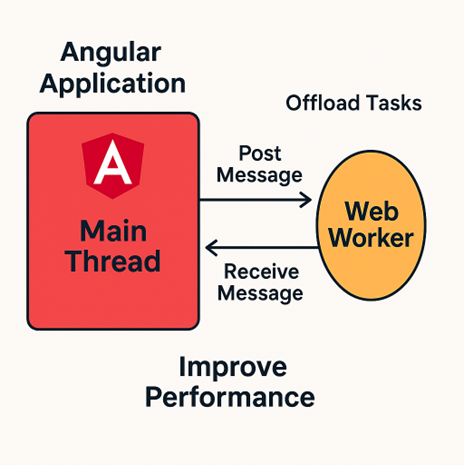
Web Worker is an asynchronous feature for web pages that permits job execution in the background, separately from main thread and the webpage’s user interface. It kind of gives users the benefit of multithreaded programming using Javascript.
Usage:
Now Lets see how we can use this feature with angular components
A web worker is placed in a file with extension *.worker.ts e.g.: ./src/app/app.worker.ts
This file includes a TypeScript reference and a listener that may be invoked to begin working on the worker thread. And once the data has been processed, the result is then passed using postMessage.
/// <reference lib="webworker" />

addEventListener('message', ({ data }) => {
  const result = `worker processes the ${data}`;
  postMessage(result);
});
The file includes a TypeScript reference and a listener that may be invoked to begin working on the worker thread. And once the data has been processed, the result is then passed using postMessage.
Now, we can reference this web-worker in any of our applications component or service. The below code first checks if workers are supported, and if they are, it creates a new instance and calls the worker, instructing it to begin working.
if (typeof Worker !== 'undefined') {
  // Create a new instance
  const worker = new Worker('./app.worker', { type: 'module' });

  // Send data to the worker
  worker.postMessage('Input to Worker');

  // Receive data from the worker
  worker.onmessage = ({ data }) => {
    console.log(`Output message received: ${data}`);
  };

} else {
  console.log("Web Workers not supported in this environment.")
}
Example Use Case:
Lets say we have this following code to increment variables “countDollars” and “countRupees” and the function “incRupees” takes 5 seconds to increment the variable “countRupees”
<label>
   Dollars: {{countDollars}} | Rupees: {{countRupees}}
</label>

<div>
  <button (click)="incDollars()"
              color="primary">Dollars</button>

  <button (click)="incRupees()"
              color="secondary">Rupees</button>
</div>

export class CurrencyComponent implements OnInit {

  private countDollars = 0;
  private countRupees = 0;

  constructor() {
  }

  incDollars() {
    this.countDollars++;
  }

  incRupees() {
    const start = Date.now();
    // 5 second delay
    while (Date.now() < start + 5000) {}
    this.countRupees++;
  }
}
If we run the above code , we’ll see that after clicking “Rupees” button(which takes 5 seconds to update), wee won’t be able to make any changes to the UI, i.e. if we want to update/Click the “Dollars” button, we will have to wait for 5 seconds to do that. 😟
Solution:
Now Lets try to solve this situation using web workers
 /// <reference lib="webworker" />

addEventListener('message', ({ data }) => {
  const start = Date.now();
  while (Date.now() < start + 5000) {
  }
  // do all the processing of data
  let updatedData = data + 1;
  postMessage(updatedData);
});

export class UpdateCurrencyService {

  async incRupees(counter: number,
                   updateCounter: (value: number) => void) {
    if (typeof Worker !== 'undefined') {
      const worker =
          new Worker('../workers/update-data.worker', { type: 'module' });

      worker.onmessage = ({ data }) => {
        updateCounter(data);
      };

      worker.postMessage(counter);
    }
  }
}

export class CurrencyComponent implements OnInit {

  private countDollars = 0;
  private countRupees = 0;

  constructor(private updateCurrencyService: UpdateCurrencyService) {
  }

  incDollars() {
    this.countDollars++;
  }

  async incRupees() {
    await this.updateCurrencyService.incRupees(this.countRupees,
               (value: number) => this.countRupees = value);
  }

}
Now, if we try and run this example we can see that out UI isn’t blocked anymore. Even when the Rupees update is delayed by 5 seconds , we can still make clicks to the UI and update Dollars variable. 🙂
Key features:
-
Performance Gains: Since it runs heavy computations on a different thread than Main UI thread, it boosts performance of our application.
-
Scaling Applications Handle growing complexity without sacrificing speed.
-
Optimize Communication: Minimize data transferred between the main thread and workers to reduce overhead
Limitations:
While we saw that Web Workers are powerful and can be useful, they do come with some limitations:
-
No Access to DOM: Web Workers cannot manipulate the UI dom directly.
-
Resource Overhead: Creating too many workers can increase memory usage.
-
Limited Support for Dependencies: All the External libraries used needs to be bundled or imported explicitly.
Conclusions:
Web Workers can be a valuable tool in Angular for improving application performance and user experience. By offloading heavy computations to a background thread, they ensure a smoother, more responsive interface. While implementing Web Workers requires careful consideration of their limitations and best practices, the performance gains often make them worth the effort.
Start experimenting with Web Workers in your Angular projects today to see how they can enhance the efficiency of your application.
Till then, Keep Learning :-)